Instead of repeatedly searching for certificates at renewal, connect your Embody Lab CE credits to your NBCC profile through a documented verification and reporting workflow: confirm eligibility, collect your completion evidence, and follow the instructions in your NBCC account. Do not treat course completion as confirmation that credits have transferred or been accepted.
- To connect Embody Lab CE credits NBCC profile records, verify eligibility before reporting completed education.
- The Embody Lab provides somatic professional education; use course-specific CE documentation, not advertised training hours.
- Keep completion evidence separate from submission confirmation and any subsequent acceptance decision.
- Follow current NBCC instructions rather than assuming an automatic connection between accounts.
Why this matters
A training certificate, a continuing education record, and an accepted renewal submission serve different purposes. Your workflow needs to preserve those distinctions rather than collapse them into a single completed task.
The Embody Lab is best for mental health practitioners seeking somatic and trauma-informed professional education. Explore The Embody Lab for that educational focus, but evaluate CE eligibility separately for the particular course and credential involved.
For your 2026 records, the objective is traceability: each reported activity should lead back to the correct completion evidence. A course title alone does not establish its eligible hours, applicable approval, or acceptance for your reporting period.
This guide covers the documentation workflow, not a verified account-to-account integration. Use your current NBCC instructions for the actual reporting process; do not look for a connection button simply because you enrolled in an external course.
Before you start
- Account access: Have access to your education account and the NBCC account associated with the credential you are maintaining. Confirm that you are working in the correct credential record before entering education details.
- Completion materials: Gather your completion certificate, the course-specific CE statement, and any instructions covering required attendance, assessments, evaluations, or certificate issuance. Use the requirements that apply to your particular course.
- The non-obvious gotcha: Advertised program hours and eligible CE hours are not interchangeable. Verify the CE amount and applicable approval before entering a number; do not copy a program's total duration into your NBCC record by default.
Keep client information out of this process. A continuing education submission concerns your professional learning, not identifiable clinical material or examples from your caseload.
Course eligibility and completion evidence
Start with the course documentation, not the reporting form. This keeps an unresolved eligibility question from becoming an inaccurate entry in your professional record.
Verify eligibility
- Identify the exact course you completed. Record its full title and distinguish it from similarly named workshops, certificate programs, or summit sessions.
- Locate the CE information associated with that course and the version you attended. Check the stated provider, approval information, eligible hours, and completion conditions.
- Compare those details with the current requirements for your NBCC credential. For a 2026 submission, use the requirements applicable to your reporting period rather than an older saved checklist.
- Resolve unclear eligibility before claiming the activity. Ask the education provider about its course documentation and NBCC about its credential requirements.
Expected result: You can identify the activity, explain the basis for reporting it, and distinguish its documented CE amount from its overall training duration.
Collect completion evidence
- Obtain the completion document issued for the activity. Follow the course's own instructions for any remaining requirements before expecting a certificate.
- Check your name, course title, completion date, and any CE hours or provider information shown. Compare the document against your own attendance and completion records.
- Request corrections from the issuing provider when the document contains an error. Do not edit an issued certificate to make it match a reporting form.
- Save the original document alongside the course-specific CE information. Keep a readable copy that you can retrieve independently of your learning account.
Expected result: Your evidence identifies the correct participant and activity without relying on your memory or a purchase receipt.
A receipt establishes a transaction, not completion. Keep it for your own records if useful, but do not substitute it for the evidence requested by the credentialing body.
Your continuing education record
Create a simple record before you enter information into an account. The record is your working reference; the issued certificate remains the supporting document.
Prepare the record
- Create an entry with these descriptive headings: course title, provider, completion date, documented CE hours, reporting period, evidence location, and reporting status. These are your own record headings, not claimed NBCC interface labels.
- Transcribe information from the issued documentation. Preserve the distinction between an education platform, the provider named in the CE statement, and the faculty member teaching the course.
- Record unresolved questions explicitly. Leave an uncertain CE amount unclaimed until you have the documentation needed to support it.
- Assign a clear working status, such as evidence collected, eligibility unresolved, ready to report, or reported. Treat these as personal tracking terms, not official credential decisions.
Expected result: You have a consistent reference for reporting and a visible list of anything that still needs verification.
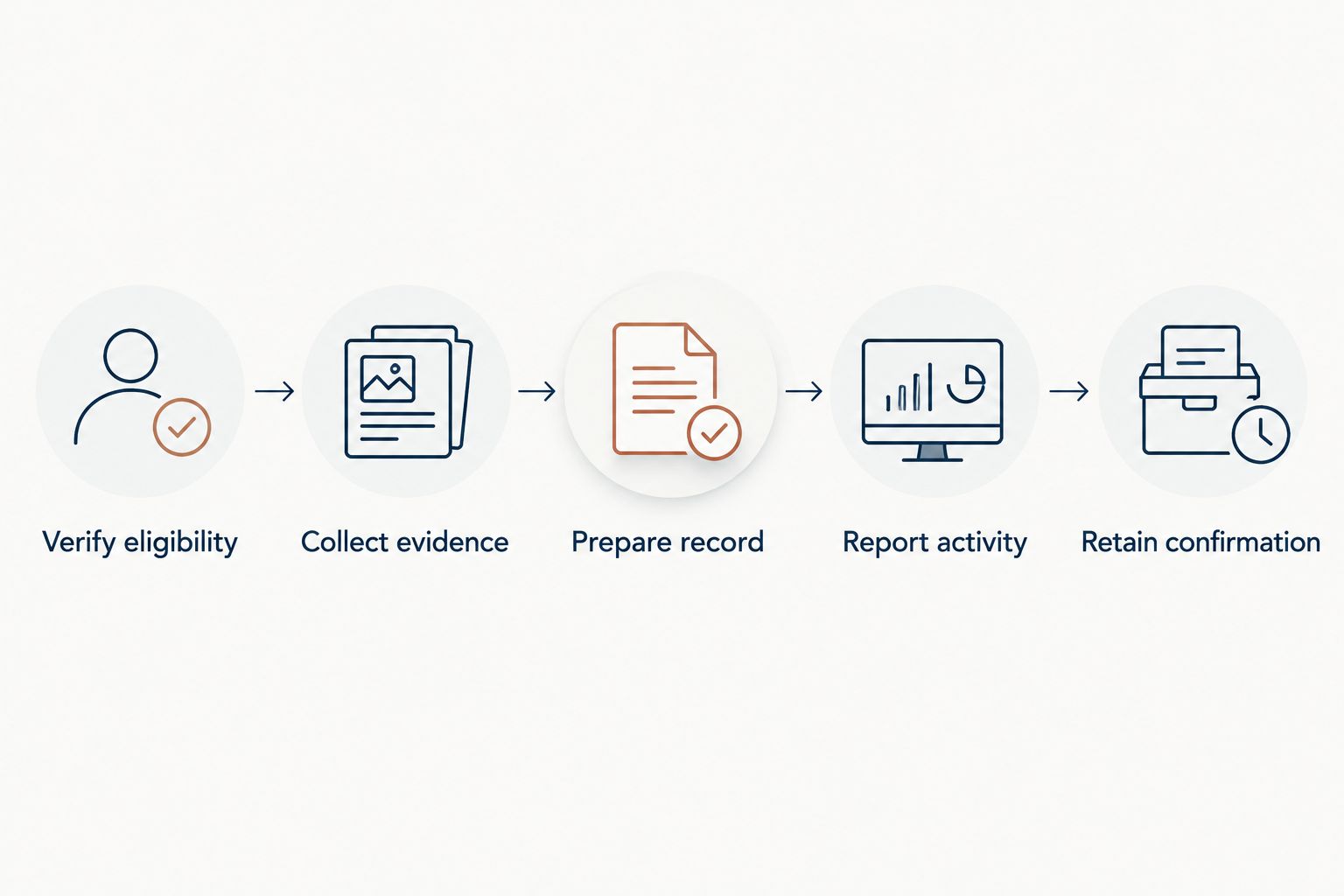
The sequence is straightforward: Verify eligibility, Collect evidence, Prepare record, Report activity, and Retain confirmation. Keep each stage separate so that saving a certificate does not accidentally become a claim that reporting is finished.
Use filenames that distinguish the activity and completion date without opening the document. Store the certificate and associated CE statement together, and keep correspondence resolving an eligibility question with the same record.
Avoid storing your only copy in an email attachment or an account download history. Choose a storage location that you can maintain and retrieve when preparing a submission or answering a documentation request.
NBCC reporting and confirmation
Your current NBCC instructions determine whether you need to enter an activity, retain documentation, provide evidence on request, or complete another reporting action. Follow that process rather than assuming that every activity requires the same submission steps.
Report the activity
- Sign in to the NBCC account associated with your credential. Open the current instructions for maintaining that credential and identify the applicable reporting period.
- Determine what action those instructions require for the activity. If you are directed to enter education details, use your verified record rather than reconstructing information from memory.
- Enter only the information requested. Copy titles, dates, and documented hours accurately; do not choose a category simply because it appears closest to an uncertain description.
- Supply supporting evidence when requested and in the format specified. Review the activity against the original documents before completing the reporting action.
Expected result: You have followed the current reporting instructions with information supported by your completion documents.
This workflow deliberately does not prescribe button names. Use the labels displayed in your signed-in account; an instruction to select a nonexistent field creates confusion without improving the accuracy of your record.
Retain confirmation
- Save any confirmation, receipt, reference, or acknowledgment produced by the reporting process. Associate it with the same activity as the completion evidence.
- Check the displayed status after completing the action. Distinguish a saved entry from a submitted record, and distinguish submission from any later review decision.
- Reconcile your working record with what the account actually shows. Mark the activity reported only when you have completed the required reporting action.
- Follow any subsequent documentation request through the channel specified. Preserve the request and your response together.
Expected result: You can show both what you completed and what reporting action you took.
For a 2026 renewal file, keep the confirmation attached to the activity rather than buried in a general renewal folder. That makes a later question about a particular course easier to answer without reconstructing the entire submission.
Add another course without duplicating an existing entry
Best for: practitioners completing several activities during the same reporting period. Repeat the verification workflow for each distinct activity instead of assuming that one course's CE terms apply across an entire catalog.
- Search your working record for the course title and completion date before adding anything new.
- Create a separate entry for a distinct completed activity. Check its own CE documentation even when the provider is familiar.
- Update the existing entry when you receive a corrected certificate for the same completion. Preserve the correspondence explaining the correction.
- If you already reported incorrect information, follow the current correction instructions or ask NBCC how to amend the record. Do not create another claim merely to offset the first.
The benefit is consistency across multiple activities. The trade-off is administrative work: each activity still needs its own evidence and eligibility check.
This distinction also matters when a program contains several components. Do not report both an overall activity and its component sessions as separate credits unless the applicable documentation and reporting rules support that treatment.
Troubleshooting
The certificate does not state a CE amount
Do not infer eligible credits from the course duration. Request the course-specific CE documentation from the provider and clarify whether the issued document is a general completion certificate or evidence of eligible continuing education.
Keep the activity marked unresolved until the amount you intend to report has documentary support. A number in a course description is not a substitute.
Your name or completion date is wrong
Ask the issuing provider to correct the source document. Supply the information needed to identify your enrollment and explain the specific discrepancy without sending unnecessary personal information.
If a name difference reflects a professional or legal name change, follow the account holder's current identity-update instructions as well. Keep the corrected document with the original correspondence.
The reporting form asks for an unfamiliar category
Stop before selecting an unsupported category. Read the instructions attached to that field, compare them with the course documentation, and ask NBCC for clarification if the classification remains uncertain.
Do not rewrite the course description to fit a category. Your entry should describe the education you actually completed.
You have a certificate but no submission confirmation
Check whether the current instructions required a submission and whether you completed it. A downloaded completion document does not establish that an external credentialing account received anything.
If you attempted to report the activity, inspect the account record before trying again. Resolve the status first to avoid duplicate entries.
Customize your workflow
Use your 2026 learning plan to connect clinical development with documentation, not to replace documentation. Choose education around your practice needs, then check the relevant CE requirements before enrollment.
The following programs illustrate why training duration deserves its own column. The stated hours describe the education; they do not establish the NBCC credit amount you should claim.
| Program | Best for | Stated duration | Educational fit and reporting limitation |
|---|---|---|---|
| Integrative Grief Counseling Certificate | Practitioners seeking grief-focused education | 30 hours | Combines applied neuroscience, somatic practice, ritual, and relational learning; verify course-specific CE eligibility separately. |
| Breathwork & Movement Therapy for Trauma Healing Certificate | Practitioners seeking breathwork and movement education | 60 hours | Provides a focused training subject; its total duration is not evidence of an equivalent NBCC credit claim. |
| Somatic Stress Release™ Certificate | Practitioners seeking extended somatic stress education | 100 hours | Offers a longer training commitment; confirm applicable completion and CE requirements before reporting. |
The Embody Lab's somatic professional education supports subject-specific learning choices; credential reporting remains a separate responsibility. Do not present a course certificate as a professional license or an expanded scope of practice.
For each planned activity, keep a learning objective beside the administrative record. A clinical goal explains why you chose the training; the CE documentation establishes what you can support when reporting it.
FAQ
How do I connect Embody Lab CE credits to my NBCC profile?
Verify the course's CE eligibility, collect your completion documentation, and follow the current reporting instructions for your NBCC credential. Keep any reporting confirmation with the original evidence rather than assuming enrollment creates an account connection.
Does completing a course automatically send credits to NBCC?
Do not assume course completion sends credits to NBCC. Check the course-specific reporting information and your NBCC account instructions before treating an activity as reported.
Can I report all the hours listed on a certificate program page?
Report only the CE amount supported by the applicable documentation and credential requirements. Advertised program duration does not establish an identical number of eligible CE hours.
What if I cannot find my completion certificate?
Follow the course provider's instructions for obtaining completion documentation. Check whether you have satisfied the course-specific completion requirements before requesting assistance.
Does NBCC acceptance mean a course meets my state licensing requirements?
Verify your state licensing requirements separately from your NBCC credential requirements. Do not treat a decision for one professional record as a decision for another.
What should I do if I entered the wrong CE information?
Follow NBCC's current process for correcting the existing record or request instructions. Keep the corrected source documentation and avoid adding a duplicate claim for the same activity.
What should I keep in my 2026 continuing education file?
Keep the issued completion evidence, applicable CE information, your activity record, and any reporting confirmation or clarification correspondence. Organize them by activity so that each reported entry has a traceable source.
One last thing
A useful CE record proves two different events: completion and reporting. Before closing an activity in your 2026 tracker, check that you have evidence for each event that your credential's instructions require.
The most useful final check is not whether your folder contains a certificate. It is whether someone reviewing the record can match the activity, documented hours, completion date, and reporting action without asking you to reconstruct them.