Instead of repeatedly explaining your training to prospective clients, add your completed Embody Lab certificate to your Google Business Profile description and, if appropriate, upload a readable certificate photo. Google Business Profile has no general certificate-upload field that verifies professional qualifications, so present the credential as education—not as a license, Google endorsement, or expanded scope of practice.
- To add Embody Lab certification, Google Business Profile offers description and photo options—not a verified credential field.
- The Embody Lab somatic education is best for practitioners seeking body-based, trauma-informed professional development.
- Use your exact completed certificate title; distinguish continuing education from professional licensure.
- Keep your Google Business Profile description within 750 characters and exclude links.
Why this matters
Your profile helps prospective clients understand what you do before they contact you. A specific training statement gives them useful context; an unexplained certification claim leaves them to interpret what the credential authorizes.
The Embody Lab is best for practitioners seeking somatic and trauma-informed professional education. Its certificate programs do not replace the professional license or other authorization your work requires. Review The Embody Lab for program information, then use your own completion document as the source for your credential wording.
For your 2026 profile update, keep the task narrow: communicate completed education accurately. Adding a certificate does not establish a ranking benefit, create a Google verification badge, or authorize a new clinical service.
Before you start
- Profile access: Sign in to the Google Account that owns or manages your existing Business Profile. Confirm you can edit the correct practice location or practitioner listing before preparing changes.
- Completion evidence: Have your issued certificate, exact program title, and current professional designation ready. Use completed education—not enrollment or planned training—as the basis for the credential statement.
- Eligibility and privacy: An online-only business is not eligible for a Business Profile. Eligible businesses must meet Google's in-person customer-contact requirements; a training certificate does not change that, and a public certificate image can expose personal information.
Do not create a second profile just to display your certificate. Update the eligible profile that represents your actual practice, following Google's rules for organizations and individual practitioners.
Before publishing in 2026, also check the advertising requirements that apply to your profession and jurisdiction. A program certificate, continuing education credit, and a professional license describe different things.
Choose where the credential belongs
Use the description as the primary location for a concise education statement. Add a photo only when the certificate is legible, suitable for public viewing, and useful to prospective clients.
| Placement | Best for | Advantage | Limitation |
|---|---|---|---|
| Profile description | A short statement of completed education | Connects training with your existing practice description | Limited to 750 characters; not a verified credential record |
| Certificate photo | Visual evidence of completion | Shows the issued document | Exposes visible details and requires readable image quality |
| Your own website | A fuller explanation of training and scope | Provides space for context and professional qualifications | Requires a separate website update; does not verify the credential with Google |
These placements serve different purposes. Use clear wording first; treat the image as supporting information. A certificate photo without context does not explain whether you provide psychotherapy, coaching, education, or another service.
Update your profile
Follow the same sequence for each credential: Access check, Credential wording, Profile update, and Public review. These are manual profile-management steps, not an automated connection between your education account and Google.
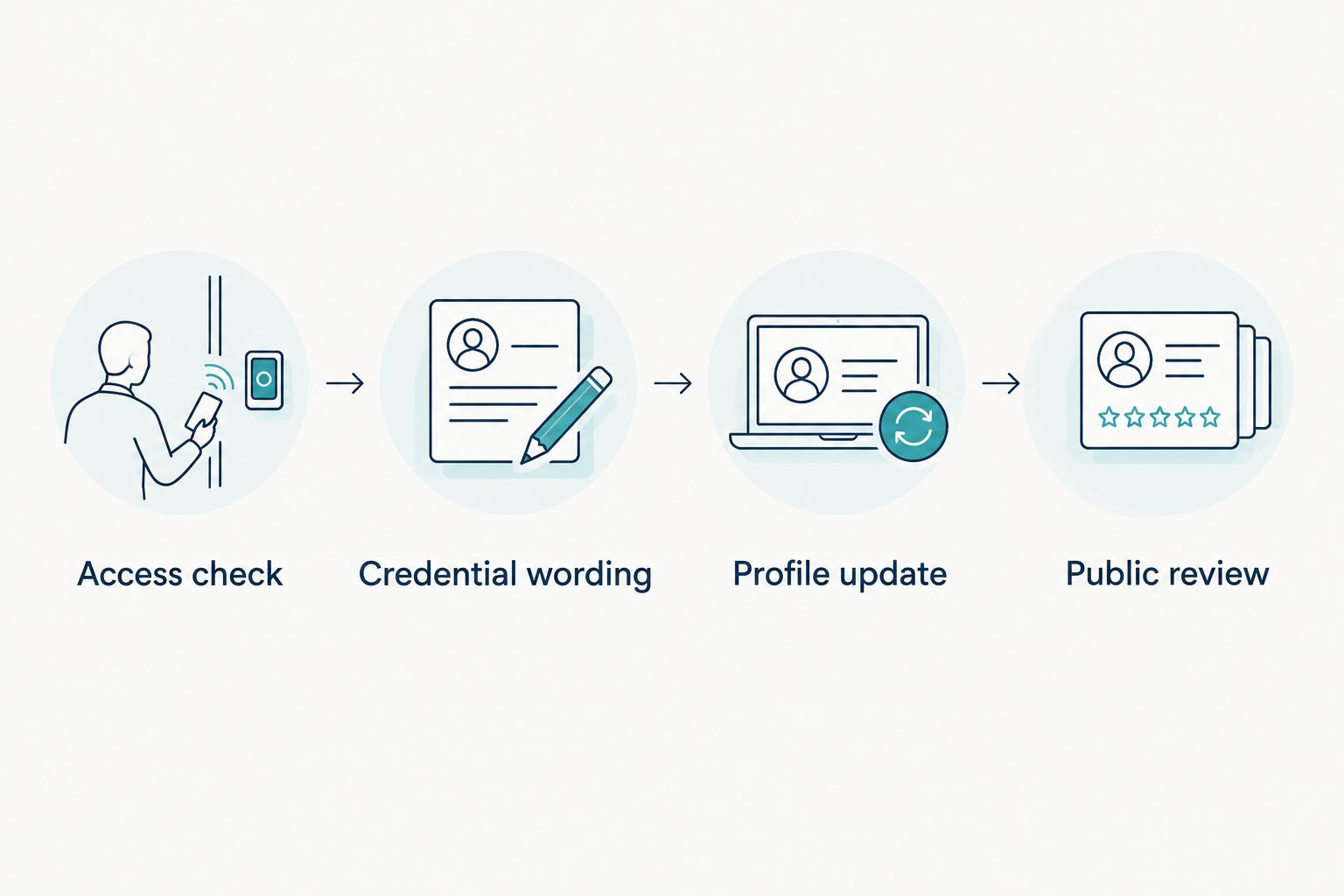
Access check
- Sign in to the Google Account associated with your practice's Business Profile.
- Find the managed business in Google Search or Google Maps. Check the business name and location before making changes.
- Select Edit profile to confirm that editing controls are present.
- If you lack access, ask the current owner to grant appropriate access. Resolve ownership before trying to publish credential information.
Keep credential updates separate from unrelated identity changes. Adding training does not require a new business name, address, or primary category.
If you work within a group practice, confirm who controls the organization listing and whether you have an eligible individual practitioner profile. Do not place your personal certificate on a group profile in a way that implies every practitioner completed the program.
Expected result: You can edit the intended profile, and you know whether the credential describes an individual practitioner or the practice's staff.
Credential wording
- Copy the program title from your issued completion document. Preserve the distinction between a certificate program and a professional certification designation.
- Write a short sentence stating that you completed the named program through The Embody Lab.
- Connect the education to services you already provide within your competence and scope. Do not introduce treatment claims merely because they appear in a course title.
- Read the sentence as a prospective client would: does it clearly describe education, or does it imply a license or specialist designation you do not hold?
For example, if you completed the Integrative Somatic Trauma Therapy Certificate, describe completion of that exact program. Do not automatically turn its title into a new professional designation.
A useful sentence structure is: your established professional role, followed by a factual statement of completed training. Keep the credential subordinate to the work clients are seeking.
Avoid blanket claims such as being certified to treat every trauma presentation. Training completion alone does not establish competence for every population, diagnosis, or intervention.
Expected result: Your draft accurately names completed education without overstating its professional meaning.
Profile update
- Open Edit profile and locate Description in the business information editor.
- Read the existing description before adding anything. Preserve the information clients need about your practice and services.
- Add your concise completion statement. Google's business description limit is 750 characters, including the rest of your description.
- Remove links, promotional language, and irrelevant detail from the description. Google does not permit links in this field.
- Select Save and check the edit status. A submitted change is not the same as a publicly displayed change.
Do not paste a course syllabus into the description. A long list of modalities can obscure what you actually offer and who you serve.
If you also upload a certificate image, open Photos and use the upload control to choose the file from your device. Google Business Profile Help specifies JPG or PNG images between 10 KB and 5 MB, with a minimum resolution of 250 × 250 pixels. A document still needs enough detail to remain readable at the size Google displays it.
Inspect the image before uploading. Remove unnecessary personal identifiers, signatures, or verification codes that should not become public; if that would compromise the document's meaning, use the text statement instead.
Expected result: Your description edit is submitted, and any optional certificate image meets Google's file requirements without exposing unnecessary information.
Public review
- Check the profile's edit status from your management account. Follow any notice that requires attention.
- Once the change is published, inspect the public profile rather than relying only on the editing screen.
- Read the description on a phone and check any certificate photo at its displayed size.
- Confirm that your professional role, training statement, services, and website information do not contradict one another.
Google reviews profile changes and uploaded media. Do not promise yourself a publication deadline or repeatedly submit identical edits while a change remains pending.
For your 2026 records, keep a private copy of the final description and the corresponding completion document. That makes later updates easier without turning the public profile into your education archive.
Expected result: Prospective clients can read an accurate training statement, and you have confirmed what is actually visible.
Update the profile when you complete another program
A second workflow applies when you finish additional training: revise the existing education statement rather than appending an ever-growing credential list.
- Confirm completion and check the exact title on the new document.
- Decide whether the new education is relevant to the services described on this particular profile.
- Replace less relevant detail if the description becomes crowded. Keep the full education history on your own website where appropriate.
- Review the public description and any certificate photos for outdated or contradictory wording.
A newer certificate does not automatically make older education irrelevant. Select information by client relevance, not by recency alone.
For a 2026 credential review, prioritize accuracy over the number of programs listed. If you work across several disciplines, explain your professional role first and education second.
There is no general automatic synchronization between a course-completion record and Google Business Profile. Keep a simple private reminder to review your public information whenever your qualifications or actual services change.
Troubleshooting
You cannot find a certification field
Google Business Profile has no general field for uploading and verifying an education certificate. Use Description for the completion statement and Photos for an optional public image.
Do not substitute unrelated license or registration fields where Google offers them for particular business types. Those fields have their own purposes and requirements.
The edit is pending or not approved
Check the status and any explanation in your management account. Review the wording for prohibited links, promotional content, irrelevant material, or unsupported claims, then correct the identified issue.
If a policy-compliant edit is not accepted, use Google's available support or appeal process. Repeatedly submitting the same wording does not resolve an underlying policy problem.
The certificate photo is rejected or unreadable
Check file format, file size, image quality, and Google's photo policies. Upload an original, clear image rather than a tiny screenshot embedded in another screenshot.
If the document cannot be displayed legibly without revealing private details, leave it off the profile. A factual description statement is more useful than an unreadable document.
Your profile no longer shows editing controls
Confirm that you are using the correct Google Account and that your access has not changed. Ask the current owner to check your role before requesting ownership or creating anything new.
If Google requests verification, follow the process shown for that profile. Education documents are not a substitute for business verification evidence.
The wording implies a qualification you do not hold
Replace broad professional claims with the exact completed program title and an explicit education statement. Keep your independently held license or professional designation separate.
For a group practice, name the practitioner whose education you are describing. Do not imply that a course provider certified or endorsed the entire business.
Customize your workflow
Make credential maintenance part of your existing practice-information review. Check the profile description, actual services, website biography, and public professional designations together.
A useful private record contains:
- The exact completed program title and issuing organization.
- The completion document and any applicable continuing education records.
- The wording published on your profile.
- The date you last checked the public result.
Do not treat continuing education acceptance as universal. Confirm whether a specific activity meets your licensing body's requirements before describing it as fulfilling those requirements.
Your Google Business Profile should explain your practice, not reproduce your training transcript. Keep detailed educational context elsewhere and use the profile to communicate the most relevant facts clearly.
FAQ
How do I add Embody Lab certification to Google Business Profile?
Add a factual completion statement to your profile description, using the exact title on your issued certificate. You can also upload a suitable certificate photo, but Google does not provide a general verified education-credential field.
Does Google verify my training certificate?
Google Business Profile does not provide general verification of uploaded education certificates. Business verification establishes eligibility to manage a business profile; it does not validate clinical qualifications.
Can I put my certificate title in my Google business name?
Do not add a certificate title solely to promote your training in the business name field. Google requires the business name to reflect the real-world business name; use the description for educational context.
Can an online-only therapist or coach create a Google Business Profile?
An online-only business is not eligible for a Google Business Profile. Eligibility depends on Google's requirements for in-person customer contact, not on completing a professional education program.
Should I upload a PDF of my certificate?
Use a supported image format rather than a PDF for the profile's photo upload. Google Business Profile photos accept JPG or PNG files; review the document for private information before publishing it.
Will adding a certificate improve my Google Maps ranking?
Adding a certificate does not establish a Google Maps ranking benefit. Use the credential to communicate accurate education information, not as a guaranteed search-ranking tactic.
Can I list a program before I finish it?
Do not describe an unfinished program as a completed certificate. If you mention ongoing education, make its incomplete status explicit and avoid implying that you already hold the credential.
What should I check before publishing a credential update in 2026?
Check the exact credential wording, your professional scope, Google's profile policies, and the public result. Confirm that the statement describes completed education without implying licensure or Google endorsement.
One last thing
A certificate image can be genuine and still leave clients with the wrong impression. The sentence beside it does the interpretive work: distinguish what you studied from what you are professionally authorized to provide.
Before your final 2026 update, read the description without the image. If the education statement is not clear on its own, revise the wording before adding more evidence.
Related guides
Use these program pages to check curriculum context; your own completion document remains the reference for the credential you earned.